Uploads To Sage
Use the Upload option on the menu to update Sage with amended or new values.
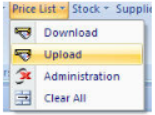
- Price and New Price can be amended
- Lines can be removed or added
- Upload can be made to multiple Price Lists, SOP, POP or both
The screen immediately following will be shown. The screen shown is for a spreadsheet like
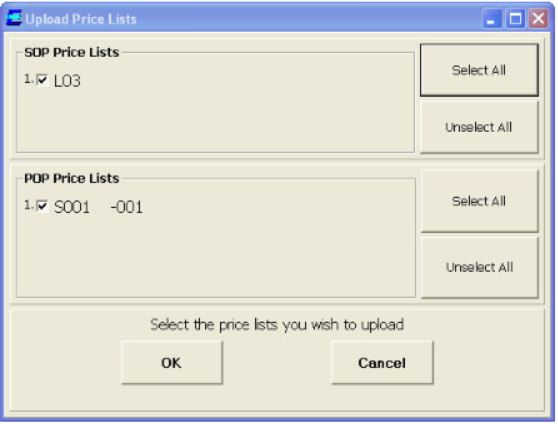
The price list code will default to the value entered on the sheet, although this can be changed.
A new price list code can be entered if user wish to create a new code.
Changing Existing Price Lists
If the price list already exists, the following screen will be displayed.
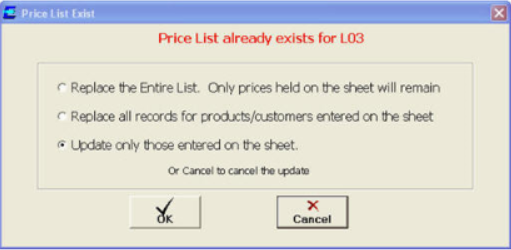
This is a very important choice.
- The first option will delete the current price list, and replace it with the data on your spreadsheet.
- The second option will delete all the prices held on the existing price list for product or product/customers that user have entered in the sheet
- The third option will just replace the lines entered, according to their product, or product/customer, or product/customer/promotional dates.
- This option must be used carefully if using with promotional dates, and user may get an error regarding overlapping promotional dates, when entered dates overlap with existing ones.
For instance, if user Price List as held in Sage contained this data:

But your new data contained this:

Note, that the 469-102 is not longer there. Also, promotional prices for 469-167 have gone, and the price for this product has changed.
If "Replace Entire List" then this is exactly how the Price List will appear after the upload. All the old data has been replaced by all the new data.
If "Replace all record for products..." then the Price List will be:

Note, that 469-102 has been left untouched, but promotional price records for 469-167 have been removed, and the new price has been stored.
If "Update only those.." is selected then the Price List will be..

Note, that 469-102 and promotional price records for 469-167 have been left untouched, but the new price has been stored.
If the second option is selected, then the four lines will be deleted, and the new line inserted to replace this. No other data will be left unchanged, as far as this line goes. The final data will be: