Multi-order Spreadsheets
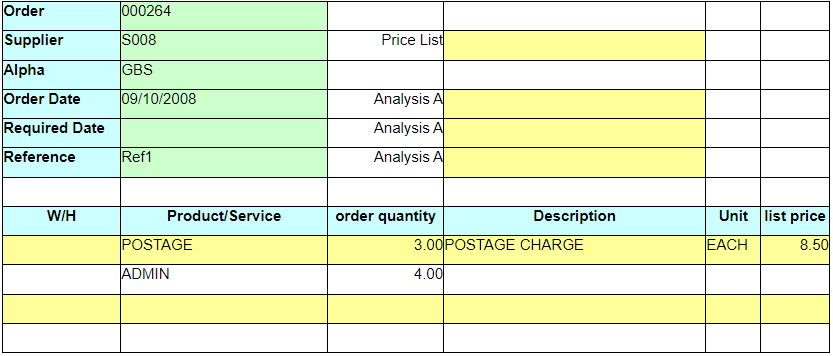
Purchase Orders Excelerator can produce single purchase orders per spreadsheet sheet.
where the purchase order and other header information (e.g supplier, alpha, order date) is at the top of the sheet.
Below is an example of a single purchase order sheet.
It is also possible to set up your sheet to allow more than one purchase order to be entered.
User do this by having the header information in columns beside the detail information (e.g. product, quantity).
Below is an example of a multi-order sheet.
Purchase Orders | ||||||
Order number | Supplier code | Wh | Product | Description | Long description | Quantity |
When processing a multi-PO spreadsheet, the Excelerator program reads each row of data in turn, including header information.
When a value in a �key range� changes, it considers that to be the start of a new purchase order.
Key ranges are purchase orders numbers, suppliers, reference, alpha code, header analysis a, b and c.
If a blank value is found in any of these, it is NOT considered to be a change (and therefore not a new order).
Key ranges are:
- purchase orders numbers
- suppliers
- reference
- alpha code
- header analysis a, b and c.
If a blank value is found in any of these, it is NOT considered to be a change (and therefore not a new order).