Creating your own templates
See the standard instructions for a general guide on how to create your own spreadsheets for entering purchase invoices.
Spreadsheet Design
Purchase Ledger Invoice Excelerator offers great flexibility in how spreadsheets can be designed for entering invoice batches.
There are three basic structures for entering data:
In all cases batch number is a header cells
In addition to this, user will need to consider how user will enter your VAT
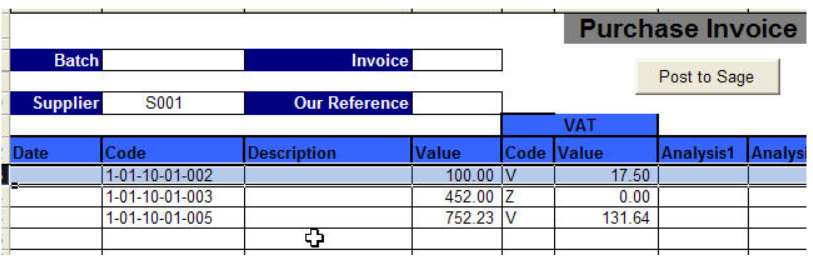
Multiple Nominal Distributions to a Single Invoice
The template should have single Excel cell supplier, invoice number and invoice amount, and other header/detail ranges ranges, in the header of the sheet.
Posting codes and amounts are columns.
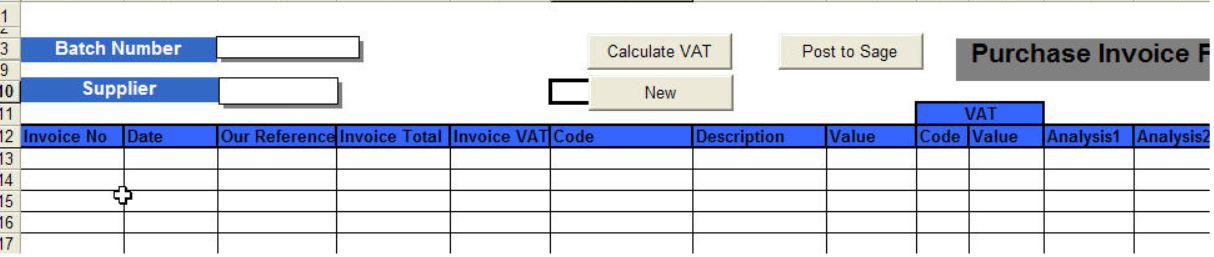
Multiple Invoices and Nominal Distributions to a Single Suppliers
The template should have a single Excel cell supplier code range in the header of the sheet.
Invoice number and invoice amounts, posting codes and amounts are columns
Multiple Suppliers and Invoices
Suppliers, invoice numbers and invoices amount, posting codes and amounts are columns.
